
Skip to content
CollectFlow

COLLECTION OPERATIONS, CONNECTED

Every account.
A clear next step.

Give your team a focused place to work accounts, manage follow-ups, and connect conversations to the information behind them.

Built for collection teams. Available for guided demonstrations.

01 / THE ACCOUNT WORKSPACECONTEXT → ACTION
COLLECTFLOW / ACCOUNT DESKILLUSTRATIVE DEMO
OverviewActivityDocuments
CREDITOR

Sample Credit Co.

NEXT ACTION

Follow up tomorrow

ACCOUNT NOTE

Consumer requested a callback.
Next step recorded. Ready for follow-up.

Added by the assigned collector
ACTIVITY

Callback scheduled

Account reviewed

ACCOUNT BALANCE$1,250.00
WORK QUEUE

Callbacks due

The next action,
in one place.

View account ↗
Fictional account · Sample amountsOne connected workspace

Account context, work history, and the next action—together.

01 Organize accounts02 Focus your team03 Connect conversations04 Record the next step
Illustrative scene of three professionals reviewing work together
Illustrative workplace imagery

BUILT AROUND THE PEOPLE DOING THE WORK

Better context.
A more focused team.

From a morning account review to the last callback of the day, give your staff a shared view of the work ahead.

Explore the workflow ↓

INSIDE COLLECTFLOW

A closer look
at the working day.

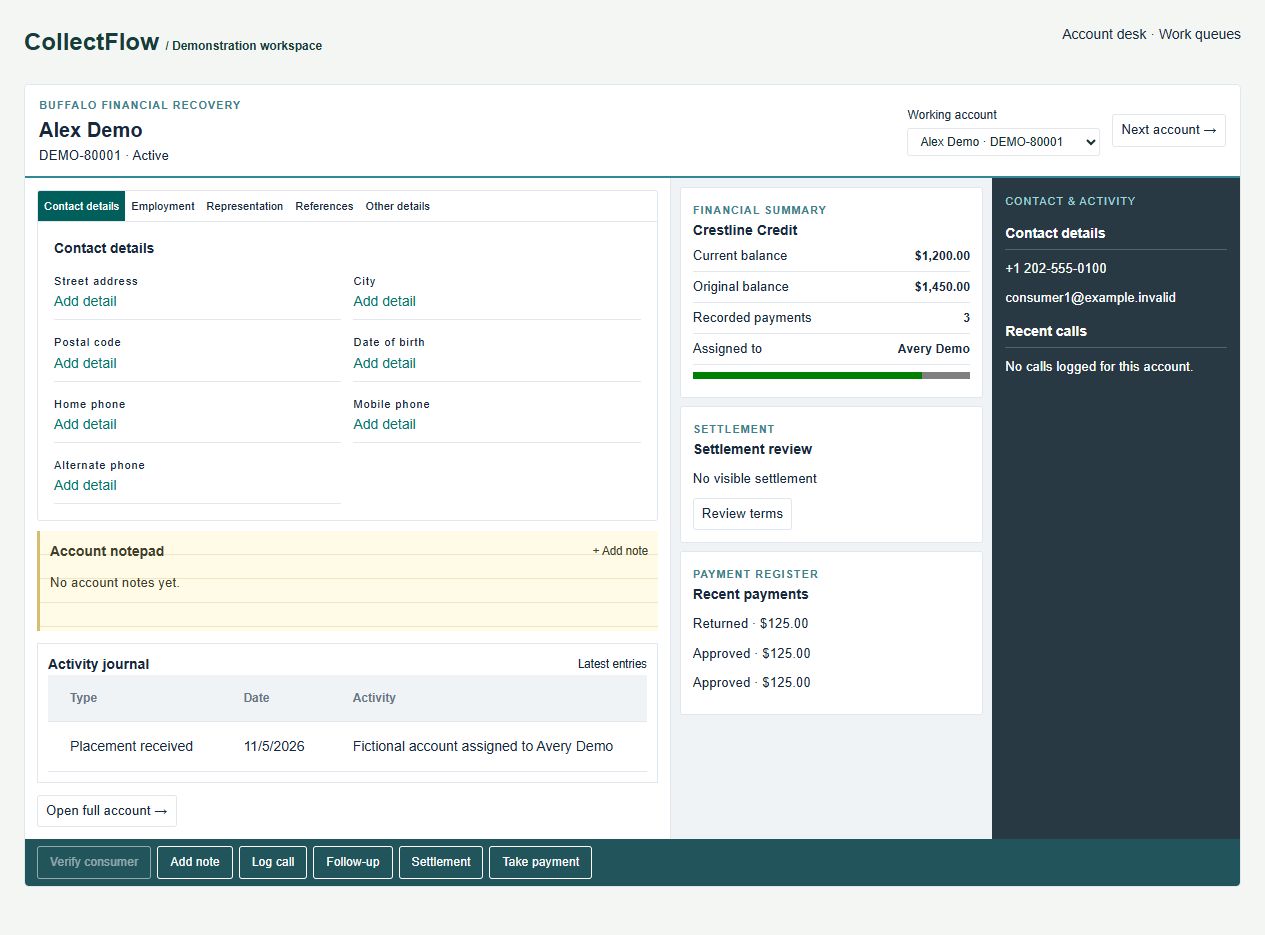
Explore the actual account desk and collector queue, shown here with fictional demonstration records.

● ● ●CollectFlow / Account desk01
Actual CollectFlow account desk with fictional records, financial summary, notes and contact rail
All the account context.Profile, history, balances, and next actions in a single workspace. Click to enlarge.
02

A queue that
keeps work moving.

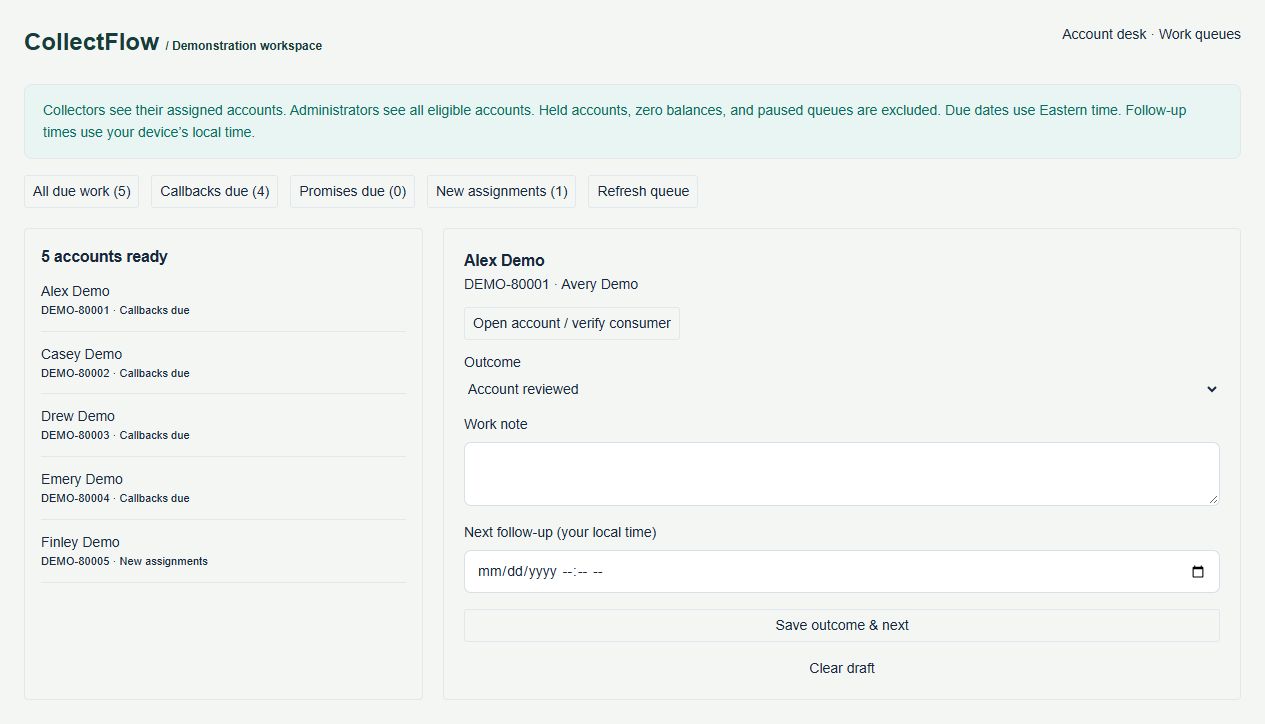
Start with due follow-ups. Record the outcome. Give every worked account a next step.

Follow the workflow ↗
● ● ●CollectFlow / Work queues
Actual CollectFlow work queue with fictional accounts and a follow-up form
Actual interface · Fictional demonstration records

THE PLATFORM

Less searching.
More account context.

From the first import to the next follow-up, CollectFlow gives staff a consistent way to find information and record their work.

01 / ACCOUNT MANAGEMENT

The details behind
every conversation.

Find accounts by reference, name, or phone. Review balances, creditor details, notes, documents, and activity in the account workspace.

  • CSV import with field mapping
  • Contact, employer, attorney, and reference fields
  • Account assignments and recorded activity

02 / COLLECTOR WORK QUEUES

A working day
with direction.

Bring due callbacks and pending promises into view. Record an outcome, add a note, and schedule the next follow-up.

  • Assigned accounts for each collector
  • Due work ahead of new assignments
  • Held accounts excluded from eligible queues
03 / STAFF ACCESS

The right tools
for each role.

Administrators manage employees, imports, and payment workflows. Collectors focus on the accounts assigned to them.

  • Individual email-and-password sign-in
  • Administrator and collector roles
  • Private employee password setup links

VOICE, WITH ACCOUNT CONTEXT

Meet the voice
of your workflow.

A configurable AI assistant can answer inbound calls, look up a selected account through controlled demo access, and transfer callers to your payment department.

Ask for a voice demonstration ↗Voice setup and telephone usage are scoped separately. Outbound calling requires configuration and testing.
Illustrative scene of a professional listening during a customer call
Illustrative workplace imagery

“Thank you for calling Buffalo Financial Recovery. How can I help you today?”

Keeysha · AI voice sample
ILLUSTRATIVE DEMO CONVERSATION
“I’d like to speak with someone about making a payment.”

“I can connect you with the payment department. Would you like me to transfer you?”

AI assistantHuman handoff ↗

FROM PLACEMENT TO FOLLOW-UP

Make the handoffs
easier to follow.

  1. 01

    Import and review

    Map your CSV fields and review the accounts entering the workspace.

  2. 02

    Assign the work

    Give each collector an account list and use due-work categories to focus their day.

  3. 03

    Work with context

    Open the record, review its history, and complete caller verification before discussing account details.

  4. 04

    Save the next step

    Record the outcome and schedule a follow-up. The account returns to due work when its scheduled time arrives.

Illustrative scene of agency leaders planning their workflow
Illustrative workplace imagery

PRICING

Start with your team.
Build the right scope.

Tell us how many people will use CollectFlow, the account volume you expect, and whether you need voice integration. We’ll discuss the setup and provide a tailored quote.

COLLECTFLOW FOR YOUR AGENCY

Request pricing

A conversation about your operation, followed by a defined scope.

  • Staff access and account workflows
  • Import and onboarding requirements
  • Optional AI voice and telephone setup
  • Support and implementation needs
Discuss pricing ↗Software scope, implementation, and third-party usage will be confirmed in your quote.

BEFORE WE TALK

A few practical
questions.

Can I see the software before deciding?+

Yes. Email our sales team to arrange a guided demonstration of the account desk, work queues, and available voice workflow.

Can I bring my existing account file?+

CollectFlow supports CSV imports with field mapping. We can review your file structure during onboarding. Additional profile fields currently support manual entry.

Does every employee have their own login?+

Yes. Administrators create employee access and assign a role. Staff use their own email and password.

Does the demo process real payments?+

Payment workflows in the current demonstration are simulated. The voice assistant can transfer callers to a payment department. Production payment integration is a separate implementation requirement.

Is CollectFlow ready for my agency’s production requirements?+

The current platform is available for guided demonstrations. Production onboarding requires an agreed scope and validation of your agency’s security, operational, and compliance requirements.

LET’S LOOK AT YOUR WORKFLOW

Bring your questions.
We’ll bring the workspace.

Request your demonstration ↗sales@collectflow.site